


Microsoft Authenticator and Passkey Registration Guide

Sep 16, 2026
136

Microsoft Authenticator and Passkey Registration Guide
Step 1: Open Security Info
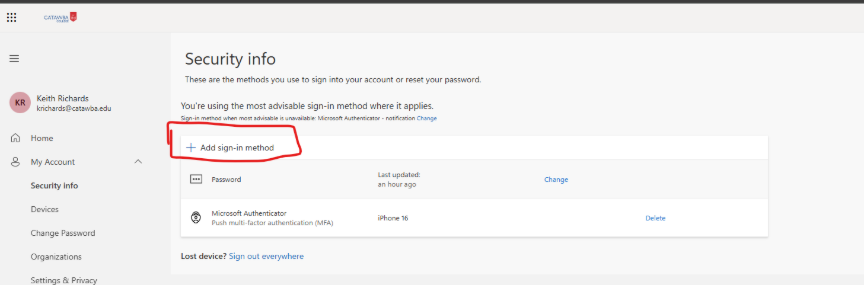
Go to https://mysignins.microsoft.com/security-info and sign in with your Microsoft 365 account.
Step 2: Add a Passkey
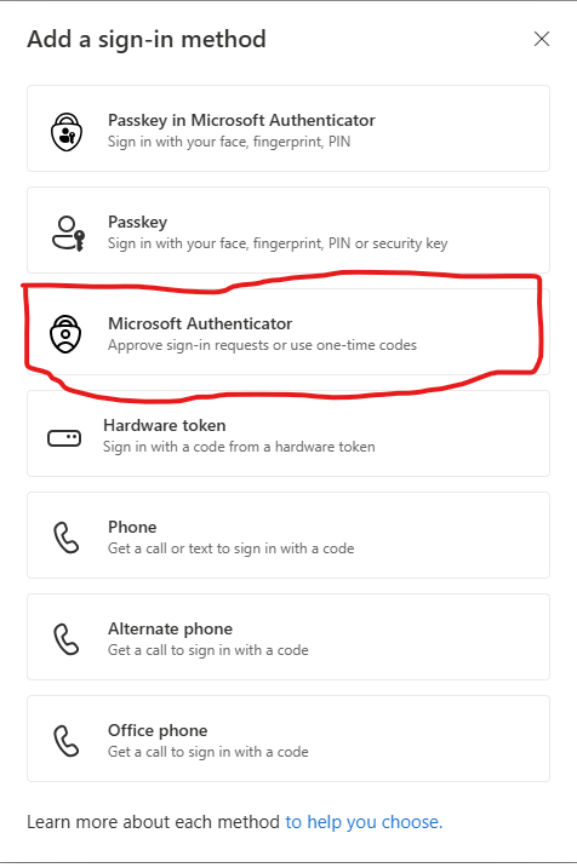
Select Add sign-in method and choose Passkey. Follow the prompts to store the passkey on your device or in Microsoft Authenticator.
Step 3: Complete Registration
Select the Microsoft Authenticator App or Passkey to use your fingerprint, face recognition, or device PIN when prompted.
Step 4: Test Sign-In
Sign out of Microsoft 365 and sign back in using your passkey.

